
Auto-assign cleaning tasks to your cleaners
iGMS creates a cleaning task for every checkout. Turn on Auto-assign cleaner for a property and each new task goes to your first available cleaner, who gets a text and an email at once. Setup takes 5 steps. You need your cleaners on your iGMS team and the Administrator or Head of Cleaners role.
AirbnbVrboBooking.comDirectBeginnerAbout 5 minutes per property
On this page
At a glance
| Time | About 5 minutes per property (estimate) |
|---|---|
| Difficulty | Beginner |
| Plan | Every plan: FLEX, PRO and PRO+ (compare plans) |
| Feature | Cleaning management |
| Works with | Airbnb, Vrbo, Booking.com, Direct |
| Steps | 5 |
| Last checked | 19 November 2026, against the iGMS help centre |
What do you need before you start?
- Your cleaners invited to your iGMS team (see «Invite a team member with limited access»).
- The Administrator or Head of Cleaners role, or the Task Management permission.
How do you auto-assign cleaning tasks to your cleaners?
Step 1 Open the property's Cleaning tab
Open the Property Editor and switch to the Cleaning tab. It holds Cleaning Tasks, Property instructions for the cleaner and Add Checklist.
Where
Properties → property → CleaningStep 2 Turn on Auto-assign cleaner and add cleaners
Under Cleaning Tasks, click Auto-assign cleaner. In the Cleaning Tasks panel, switch on Auto-assign cleaner and click Add Cleaner to add one or more cleaners from your team. With no cleaner added, nothing gets assigned.
Where
Cleaning → Cleaning Tasks → Auto-assign cleanerStep 3 Rank your cleaners
Drag and drop the cleaners in the Cleaning Tasks panel to set the priority. When a task appears, the first available cleaner with the highest priority gets it. A grey name means that person can't take tasks, for example after a role change.
Where
Cleaning → Auto-assign cleaner → Cleaning Tasks panel (drag and drop)Step 4 Click Apply
The cleaners are linked to the property and take all of its existing Unassigned cleaning tasks. New reservations create tasks that are assigned the same way.
Where
Cleaning → ApplyStep 5 Follow progress in Tasks
Open Tasks to see each day's jobs and their status: Unassigned, Assigned, Accepted, Completed or Rejected.
Where
Tasks
Try it in iGMS with your own listings for 14 days.No credit card required.
Start freeWhat should you see when it works?
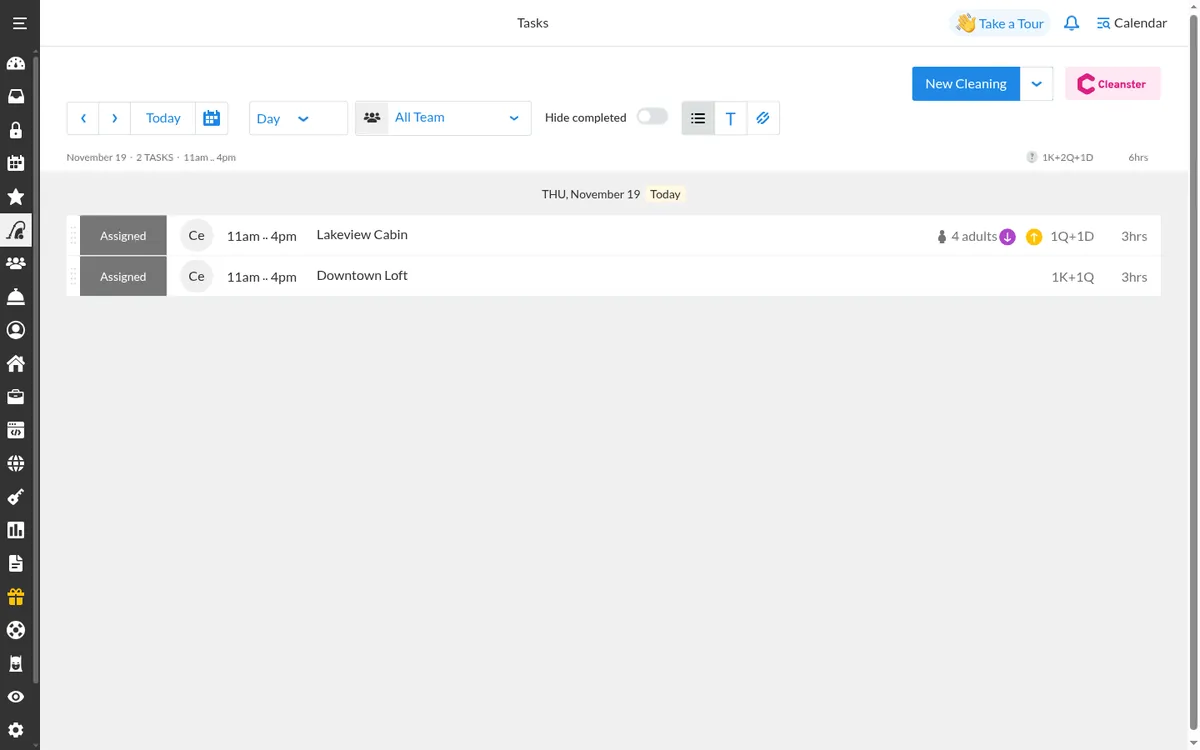
New cleaning tasks show as Assigned with the cleaner's name; the cleaner gets a text and an email right away and a reminder the evening before.
What if it does not work?
- If every auto-assigned cleaner is unavailable, auto-assignment stops for that property and tasks stay Unassigned.
- Removing a cleaner moves their tasks to the next cleaner on the list. Removing the last one leaves tasks unassigned.
- Handyman tasks can't be auto-assigned. Create them by hand.
Frequently asked questions
Are cleaners notified?
Yes. They get a text and an email when a task is created and a reminder the evening before. iGMS says text messages are free for its users.
Can cleaners use a phone app?
Yes. The iGMS app is on the App Store and Google Play and sends a push notification for each new task.
Who can set up auto-assign?
Administrators and the Head of Cleaners by default; others need the Task Management permission.
Can I put tasks in my own calendar?
Yes. Export them in iCal format to Google, macOS or another calendar.
Use this recipe with your AI agent
Copy the prompt into ChatGPT, Claude or another assistant. It loads the recipe's Agent Skill and walks you through the steps while you click.
I manage vacation rentals in iGMS. Load the skill at https://www.igms.com/go/cookbook/auto-assign-cleaning-tasks/SKILL.md (or read https://www.igms.com/go/cookbook/auto-assign-cleaning-tasks.md) and walk me through «Auto-assign cleaning tasks to your cleaners» one step at a time. Ask me what I see on screen before each step, and stop if my screen differs from the recipe.
Related recipes
- Invite · BeginnerInvite a team member with limited access
- Sync · IntermediateSync Airbnb and Vrbo calendars in one place
- Automate · BeginnerAutomate guest messages with triggers
Sources
Each step was written from the iGMS help centre on 19 November 2026. The help articles behind the steps are listed here.
| Step | Claim | Source | Status |
|---|---|---|---|
| Step 1 | Open the property's Cleaning tab | help | In the help article |
| Step 2 | Turn on Auto-assign cleaner and add cleaners | help app check | In the help article |
| Step 3 | Rank your cleaners | help app check | In the help article |
| Step 4 | Click Apply | help | In the help article |
| Step 5 | Follow progress in Tasks | help | In the help article |