
Sync Airbnb and Vrbo calendars in one place
Connect Airbnb and Vrbo to iGMS and group both listings into one property. A booking on either site then blocks the same dates on the other at once, and both show in one Multi-calendar. The recipe has 6 steps. You need Airbnb connected to iGMS, Chrome or Firefox on a computer, and your Vrbo Owner Dashboard login.
AirbnbVrboIntermediateAbout 20 minutes
On this page
At a glance
| Time | About 20 minutes (estimate) |
|---|---|
| Difficulty | Intermediate |
| Plan | Every plan: FLEX, PRO and PRO+ (compare plans) |
| Feature | Channel manager |
| Works with | Airbnb, Vrbo |
| Steps | 6 |
| Last checked | 19 November 2026, against the iGMS help centre |
What do you need before you start?
- Your Airbnb account connected to iGMS (see «Connect your Airbnb account to iGMS»).
- A desktop or laptop with Chrome or Firefox: the iGMS – Vrbo extension does not work on phones or tablets.
- Your Vrbo Owner Dashboard login, used in Owner Mode rather than Traveler Mode.
- The same property name on both sites, so the grouped property keeps one name.
How do you sync Airbnb and Vrbo calendars in one place?
Step 1 Connect your Airbnb account
Follow «Connect your Airbnb account to iGMS» if you have not done it yet.
Where
Getting Started → AirbnbStep 2 Choose the browser-extension route in iGMS
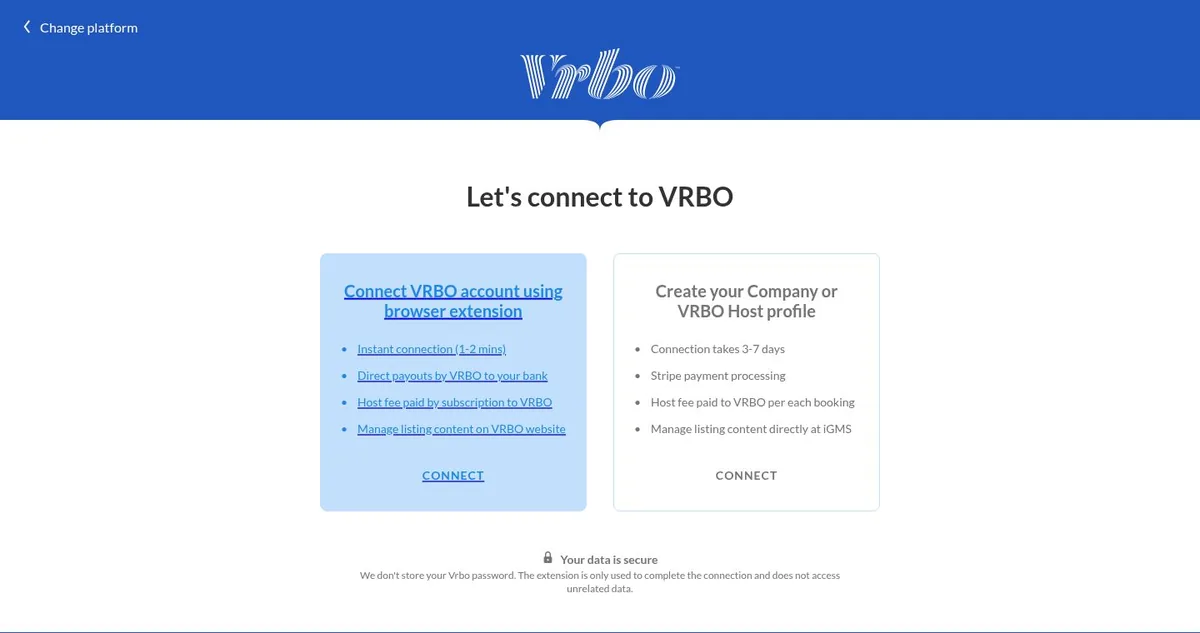
In iGMS, open Accounts & Listings, click Connect Account and pick the Vrbo card («Connect Expedia Family account, including Vrbo, Abritel, HomeAway accounts»). On «Let's connect to VRBO», choose «Connect VRBO account using browser extension»: iGMS lists it as an instant connection (1–2 minutes), with payouts from Vrbo to your bank.
Where
Accounts & Listings → Connect Account → Vrbo → Connect VRBO account using browser extensionStep 3 Install the iGMS – Vrbo extension
On your computer, add the «iGMS – Vrbo» extension from the Chrome Web Store (Add to Chrome, then Add Extension). Its icon appears in the browser toolbar.
Where
Chrome Web Store → iGMS – Vrbo → Add to ChromeStep 4 Connect the Vrbo account from the extension
In the same browser profile, sign in to iGMS and to your Vrbo Owner Dashboard in Owner Mode. Click the extension icon, then Open your Vrbo Account Settings, then Connect Vrbo Account. Check that Accounts & Listings now shows the Vrbo account.
Where
Extension → Open your Vrbo Account Settings → Connect Vrbo AccountStep 5 Group the Airbnb and Vrbo listings
Open the property from Accounts & Listings. In the Channels panel on the right of the Property Editor, click Edit, then Add Property or Group. Pick the Vrbo listing and click Save.
Where
Accounts & Listings → property → Channels → Edit → Add Property or Group → SaveStep 6 Remove the old iCal links
Delete any iCal links between the Airbnb and Vrbo listings. The channel manager blocks dates faster than iCal, and keeping both can block dates twice.
Where
Property Editor → iCal tab
Try it in iGMS with your own listings for 14 days.No credit card required.
Start freeWhat should you see when it works?
The property shows as one row in the Multi-calendar with reservations from both Airbnb and Vrbo, and its Channels panel lists both listings.
What if it does not work?
- Can't find the Vrbo listing when grouping? It may be set up as a parent-child property. Check the General tab of the Property Editor.
- Group shows the wrong name? A group takes the first listing's name. Ungroup, rename the listings to match and group them again.
- Vrbo shows as disconnected later? Follow the iGMS article on reconnecting a Vrbo account.
- TripAdvisor and other iCal-only sites can't be grouped. They sync through iCal.
Frequently asked questions
Do I pay twice for a rental listed on Airbnb and Vrbo?
No. If you group the listings of one rental, iGMS bills you for one property, whatever the number of channels.
Does grouping change my reviews or reports?
No. Review templates stay channel-specific and reports still use listing data.
I'm new to Vrbo. Can I create the account from iGMS?
Yes: on «Let's connect to VRBO» choose «Create your Company or VRBO Host profile». iGMS says this connection takes 3–7 days, uses Stripe payment processing and lets you manage listing content in iGMS; Vrbo charges its host fee per booking.
Can Vrbo have different prices?
Yes. Set prices and minimum stay for the whole property or for each channel in the Single Property Calendar.
Does the Vrbo extension work on a phone?
No. Connect on a desktop or laptop; browser extensions don't run on phones or tablets.
Use this recipe with your AI agent
Copy the prompt into ChatGPT, Claude or another assistant. It loads the recipe's Agent Skill and walks you through the steps while you click.
I manage vacation rentals in iGMS. Load the skill at https://www.igms.com/go/cookbook/sync-airbnb-and-vrbo-calendars/SKILL.md (or read https://www.igms.com/go/cookbook/sync-airbnb-and-vrbo-calendars.md) and walk me through «Sync Airbnb and Vrbo calendars in one place» one step at a time. Ask me what I see on screen before each step, and stop if my screen differs from the recipe.
Related recipes
- Connect · BeginnerConnect your Airbnb account to iGMS
- Connect · IntermediateConnect a Booking.com property to iGMS
- Connect · BeginnerConnect PriceLabs to iGMS for dynamic pricing
Sources
Each step was written from the iGMS help centre on 19 November 2026. The help articles behind the steps are listed here.
| Step | Claim | Source | Status |
|---|---|---|---|
| Step 1 | Connect your Airbnb account | help | In the help article |
| Step 2 | Choose the browser-extension route in iGMS | app check help | In the help article |
| Step 3 | Install the iGMS – Vrbo extension | help | In the help article |
| Step 4 | Connect the Vrbo account from the extension | help | In the help article |
| Step 5 | Group the Airbnb and Vrbo listings | help help app check | In the help article |
| Step 6 | Remove the old iCal links | help help | In the help article |
- Connecting your vrbo account using the igms vrbo chrome and firefox extension
- How to reconnect a vrbo account when multiple sessions are disconnected
- Importing calendars to igms via ical
- How do i group listings from multiple booking platforms
- Connect airbnb account s to igms via airbnb api
- How does the channel manager work
- How to connect a vrbo account to igms via api
- iGMS app, labels checked read-only on 19–20 Nov 2026
- iGMS pricing page, plan comparison (read 19 Nov 2026)