
Connect a Booking.com property to iGMS
Pick iGMS as your connectivity provider on Booking.com and enter its property ID (4 to 8 digits) in iGMS. Then reopen the calendar and publish the listing: Booking.com prices reset when the property connects. You need access to the property on Booking.com, its property ID and XML rates.
Booking.comIntermediateAbout 20 minutes
On this page
At a glance
| Time | About 20 minutes (estimate) |
|---|---|
| Difficulty | Intermediate |
| Plan | Every plan: FLEX, PRO and PRO+ (compare plans) |
| Feature | Channel manager |
| Works with | Booking.com |
| Steps | 7 |
| Last checked | 19 November 2026, against the iGMS help centre |
What do you need before you start?
- Access to the property in your Booking.com account.
- The Booking.com property ID. The iGMS app accepts 4 to 8 digits.
- Your rates set up as XML rates. Only XML rates move to iGMS; other rates stay bookable on Booking.com but iGMS gets no data about them.
- Your prices and availability at hand: the settings you had on Booking.com are discarded on connection.
How do you connect a Booking.com property to iGMS?
Step 1 Choose iGMS as connectivity provider on Booking.com
Sign in to Booking.com and select the property. Click Account in the top menu and choose Connectivity Provider. Search for iGMS, select it and click Connect.
Where
Booking.com → Account → Connectivity Provider → iGMS → ConnectStep 2 Activate the property in iGMS
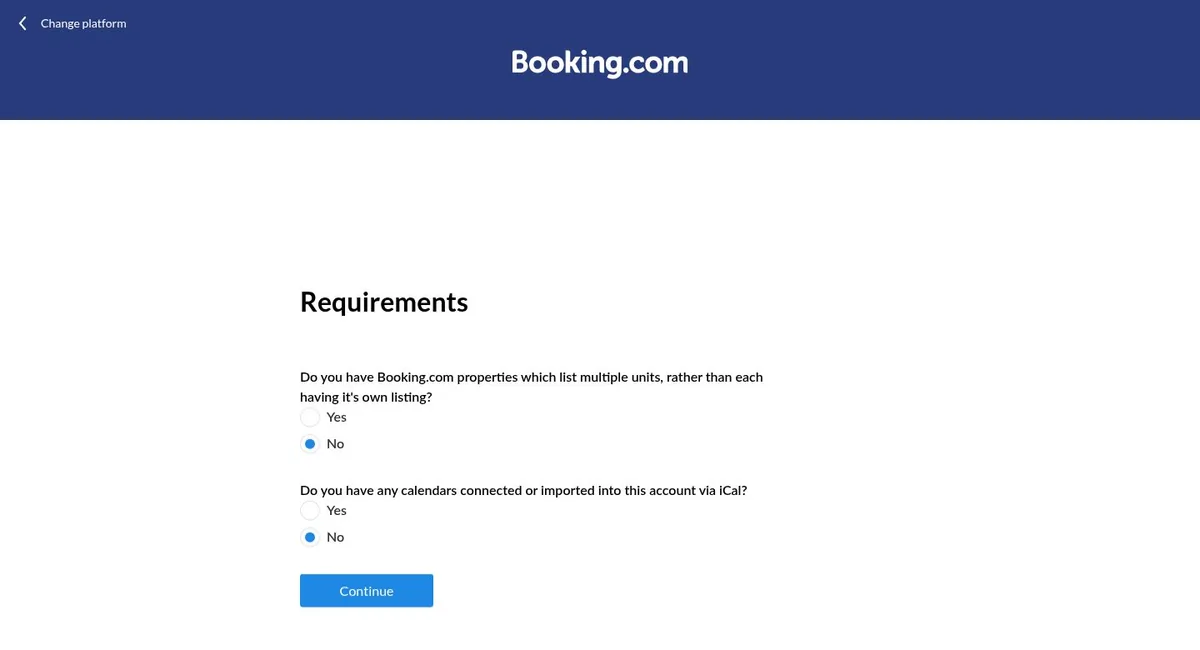
In iGMS go to Accounts & Listings, click Connect Account and pick Booking.com. On «Choose Integration Option», click «Connect to Property». The «Requirements» screen asks whether your Booking.com properties list several units and whether calendars are imported via iCal; answer both and click Continue. Next, iGMS repeats the Booking.com steps under «Choose iGMS as Your Connectivity Provider»: tick «Okay, I've met all the conditions and I'm ready to move on», then, under «Prepare Connection», enter the Property ID (4 to 8 digits).
Where
Accounts & Listings → Connect Account → Booking.com → Connect to Property → Requirements → ContinueStep 3 Group it with the same rental on other sites
If the rental is also on Airbnb or Vrbo, click Add to Property or Group and pick it. Grouping protects the property from double bookings.
Where
Add to Property or GroupStep 4 Set a Booking.com markup (optional)
To price Booking.com differently from your other channels, open the Property Editor's Pricing tab and set it under Channel Markups.
Where
Property Editor → Pricing → Channel MarkupsStep 5 Open dates and set prices
In the Multi-calendar, find the Booking.com property, select the dates, switch the availability toggle on, set a price and click Apply. A property grouped with Airbnb takes prices and availability from the Airbnb channel instead.
Where
Multi-calendar → select dates → availability on → price → ApplyStep 6 Publish the listing
Go to Properties, open the property, select Booking.com under Channels and click Publish.
Where
Properties → property → Channels → Booking.com → PublishStep 7 Add minimum stay to weekly or monthly rates
If you have weekly or monthly rates, open the Multi-calendar and click the $ sign. Click today's date next to the minimum length of stay under that rate, select the date range and enter the minimum stay.
Where
Multi-calendar → $ → minimum length of stay
Try it in iGMS with your own listings for 14 days.No credit card required.
Start freeWhat should you see when it works?
The Booking.com property shows open dates and prices in the Multi-calendar, and new bookings arrive with full guest contact details.
What if it does not work?
- Stays that checked out before the connection do not import. New bookings come with full data.
- Rates that were not XML rates are not pulled in. Create them as rates in iGMS.
- Booking.com says «no rates defined»: follow the iGMS help article on that message.
- Still not bookable after these steps? Contact Booking.com support.
Frequently asked questions
Will my Booking.com prices carry over?
No. The availability and prices you had on Booking.com are discarded when the property connects. Set them again in iGMS.
Can I connect more than one Booking.com property?
Yes. Repeat the same steps for each property.
Do I need to group Booking.com with Airbnb?
If the same rental is also on Airbnb or Vrbo, the help centre strongly recommends grouping to prevent double bookings.
Will guests' contact details come through?
Yes, for bookings made after the connection.
Use this recipe with your AI agent
Copy the prompt into ChatGPT, Claude or another assistant. It loads the recipe's Agent Skill and walks you through the steps while you click.
I manage vacation rentals in iGMS. Load the skill at https://www.igms.com/go/cookbook/connect-booking-com-to-igms/SKILL.md (or read https://www.igms.com/go/cookbook/connect-booking-com-to-igms.md) and walk me through «Connect a Booking.com property to iGMS» one step at a time. Ask me what I see on screen before each step, and stop if my screen differs from the recipe.
Related recipes
- Sync · IntermediateSync Airbnb and Vrbo calendars in one place
- Connect · BeginnerConnect your Airbnb account to iGMS
- Connect · BeginnerConnect PriceLabs to iGMS for dynamic pricing
Sources
Each step was written from the iGMS help centre on 19 November 2026. The help articles behind the steps are listed here.
| Step | Claim | Source | Status |
|---|---|---|---|
| Step 1 | Choose iGMS as connectivity provider on Booking.com | help | In the help article |
| Step 2 | Activate the property in iGMS | help app check | In the help article |
| Step 3 | Group it with the same rental on other sites | help | In the help article |
| Step 4 | Set a Booking.com markup (optional) | help app check | In the help article |
| Step 5 | Open dates and set prices | help | In the help article |
| Step 6 | Publish the listing | help | In the help article |
| Step 7 | Add minimum stay to weekly or monthly rates | help | In the help article |