
Connect your Airbnb account to iGMS
Connect an Airbnb host account to iGMS through the Airbnb API in 5 steps. Reservations, guest messages and calendars from its listings then appear in iGMS, and you manage prices and availability there. You need an iGMS account (the 14-day free trial is enough) and the primary host's Airbnb login.
AirbnbBeginnerAbout 5 minutes
On this page
At a glance
| Time | About 5 minutes (estimate) |
|---|---|
| Difficulty | Beginner |
| Plan | Every plan, including the 14-day trial (compare plans) |
| Feature | Channel manager |
| Works with | Airbnb |
| Steps | 5 |
| Last checked | 19 November 2026, against the iGMS help centre |
What do you need before you start?
- An iGMS account. The 14-day free trial is enough.
- The login of the primary host account. Co-hosted listings connect through the primary host.
- No other property management or channel manager software on that Airbnb account, or a plan to use a Limited Connection.
How do you connect your Airbnb account to iGMS?
Step 1 Sign in to the Airbnb account you want to connect
Open airbnb.com in the same browser and sign in to the host account whose listings you want in iGMS. If other software is already linked to that account, the standard connection will not complete: disconnect it first or set up a Limited Connection.
Where
airbnb.com → sign inStep 2 Choose Airbnb in iGMS
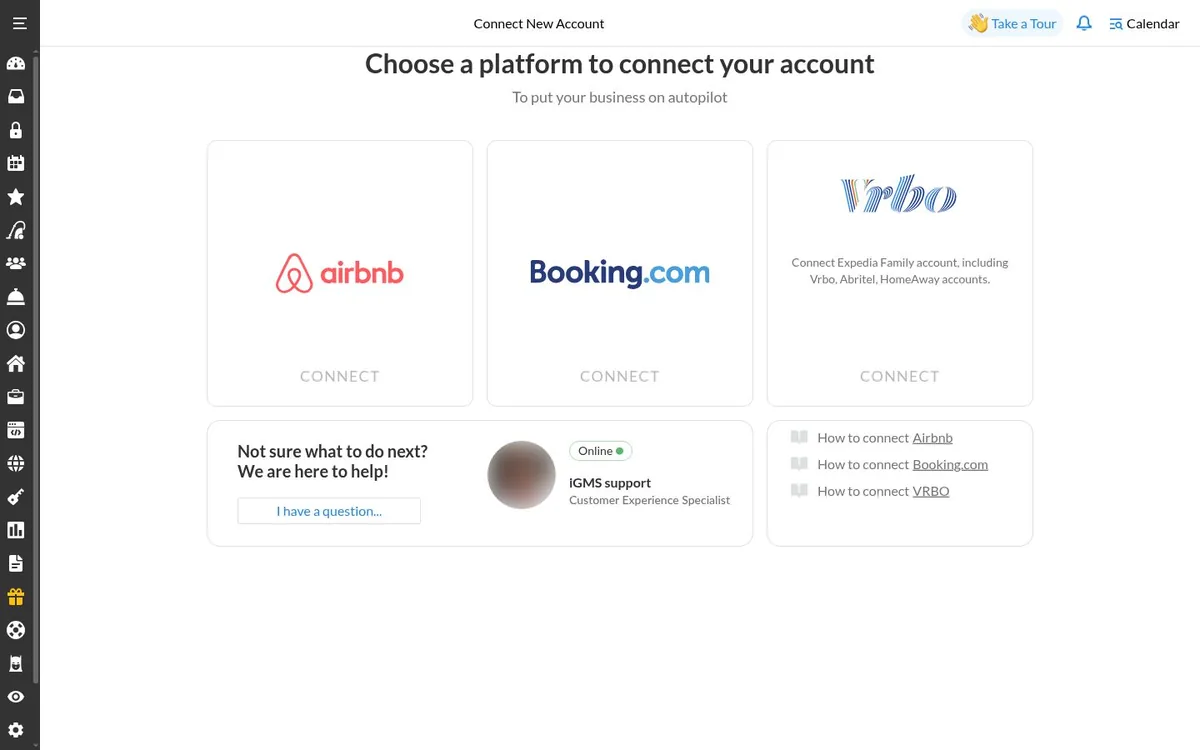
In iGMS, open Accounts & Listings and click Connect Account. On «Connect New Account», click Connect on the Airbnb card. A brand-new account may show Airbnb on its Getting Started page instead.
Where
Accounts & Listings → Connect Account → Airbnb → ConnectStep 3 Allow the sync on Airbnb's page
Read the terms on Airbnb's connection page, tick the checkbox and click Allow. Airbnb sends you back to iGMS. Wait a few seconds for the confirmation screen.
Where
Airbnb connection page → checkbox → AllowStep 4 Manage prices and blocks in iGMS from now on
Once a listing is connected through the API, its pricing and availability settings are no longer editable on Airbnb. Set rates and block dates in the iGMS calendars: dates you block by hand on Airbnb are not sent to iGMS.
Where
iGMS → Multi-calendarStep 5 Connect your other Airbnb accounts
Sign out of the first account on Airbnb, sign in to the next one and repeat steps 2 and 3. If you stay signed in to the account you already connected, Airbnb sends you straight back to iGMS.
Where
airbnb.com → sign out → sign in to the next account
Try it in iGMS with your own listings for 14 days.No credit card required.
Start freeWhat should you see when it works?
iGMS shows a confirmation screen, then lists the Airbnb account and its listings under Accounts & Listings.
What if it does not work?
- Rule-Sets you made on Airbnb may be removed by the connection. Set them again afterwards.
- Custom promotions set directly on Airbnb may not reach iGMS. Turn them off and set rates in iGMS.
- iCal calendars imported on Airbnb are removed. Add external calendars in iGMS after the connection.
- A listing must meet Airbnb's content criteria to connect through the API.
- Accounts & Listings says «Some of your listings have limited synchronization with Airbnb»? Use its «Connect All Listings to iGMS» button to move them to the full connection.
Frequently asked questions
Is the iGMS connection to Airbnb official?
Yes. The iGMS help centre says iGMS connects through the Airbnb API as an official Airbnb partner.
Can I connect co-hosted listings?
Yes, through the primary host account. Read the iGMS article on co-hosted listings before you start.
Can I still change prices on Airbnb?
No. After the API connection, prices and availability for connected listings are managed in iGMS.
Which other booking sites can I connect?
Vrbo and Booking.com connect natively. Sites such as TripAdvisor or Agoda connect through iCal.
Can I turn Instant Book on or off?
Yes. The API connection lets you control Instant Book for each listing from iGMS.
Use this recipe with your AI agent
Copy the prompt into ChatGPT, Claude or another assistant. It loads the recipe's Agent Skill and walks you through the steps while you click.
I manage vacation rentals in iGMS. Load the skill at https://www.igms.com/go/cookbook/connect-airbnb-to-igms/SKILL.md (or read https://www.igms.com/go/cookbook/connect-airbnb-to-igms.md) and walk me through «Connect your Airbnb account to iGMS» one step at a time. Ask me what I see on screen before each step, and stop if my screen differs from the recipe.
Related recipes
- Sync · IntermediateSync Airbnb and Vrbo calendars in one place
- Connect · IntermediateConnect a Booking.com property to iGMS
- Automate · BeginnerAutomate guest messages with triggers
Sources
Each step was written from the iGMS help centre on 19 November 2026. The help articles behind the steps are listed here.
| Step | Claim | Source | Status |
|---|---|---|---|
| Step 1 | Sign in to the Airbnb account you want to connect | help | In the help article |
| Step 2 | Choose Airbnb in iGMS | help app check | In the help article |
| Step 3 | Allow the sync on Airbnb's page | help | In the help article |
| Step 4 | Manage prices and blocks in iGMS from now on | help | In the help article |
| Step 5 | Connect your other Airbnb accounts | help | In the help article |