
Automate guest reviews on Airbnb and Vrbo
Write 3 positive review templates, switch on auto-reviews and set a delay of 3–4 days after checkout. iGMS then reviews each guest for you well before the 14-day review window on Airbnb and Vrbo closes. You need at least 3 positive review templates and auto-reviews turned on.
AirbnbVrboBeginnerAbout 15 minutes
On this page
At a glance
| Time | About 15 minutes (estimate) |
|---|---|
| Difficulty | Beginner |
| Plan | Every plan: FLEX, PRO and PRO+ (compare plans) |
| Feature | Airbnb automation |
| Works with | Airbnb, Vrbo |
| Steps | 5 |
| Last checked | 19 November 2026, against the iGMS help centre |
What do you need before you start?
- At least 3 positive review templates (4 stars or higher).
- Auto-reviews on in each property (on by default) and Auto-Review Agent on for each platform.
- For Vrbo, the new Vrbo connection type.
How do you automate guest reviews on Airbnb and Vrbo?
Step 1 Create a review template
Go to Reviews, open the Review Templates tab and click Create Template. Name it, write the review and add placeholders from Useful Elements, such as the guest's name or the checkout date. Click Save.
Where
Reviews → Review Templates → Create TemplateStep 2 Repeat until you have 3
Write at least 3 positive templates so guests don't all get the same text.
Where
Reviews → Review TemplatesStep 3 Check auto-reviews are on
In each Property Editor, confirm Auto-reviews are on (General tab, Features, Settings; on by default). Your profile has no separate auto-review switch: the account-wide switches are in the next step.
Where
Property Editor → General → Features → SettingsStep 4 Switch on each platform
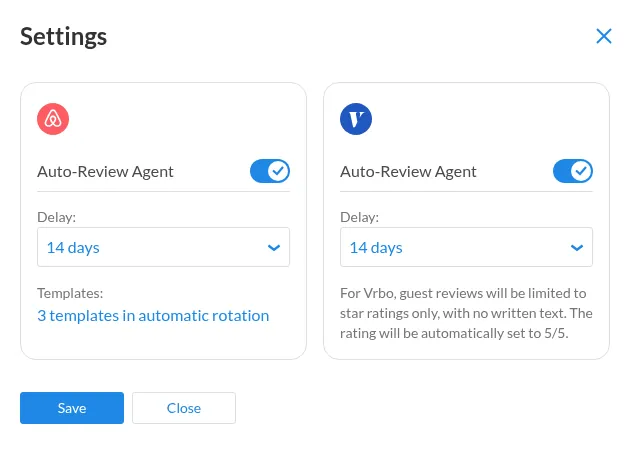
In Reviews, open the Reviews by Host tab, click Settings and switch on Auto-Review Agent on the Airbnb card, the Vrbo card or both. On Vrbo the review is a 5/5 star rating with no text.
Where
Reviews → Reviews by Host → Settings → Auto-Review AgentStep 5 Set the delay
Pick the Delay on each card, from 1 hour to 14 days, and click Save. The help centre suggests 3 to 4 days, so you can inspect the property first.
Where
Reviews by Host → Settings → Delay
Try it in iGMS with your own listings for 14 days.No credit card required.
Start freeWhat should you see when it works?
Reviews by Host → Settings shows Auto-Review Agent on for Airbnb and Vrbo with your delay, and reviews go out after checkout.
What if it does not work?
- Can't switch it on? You need at least 3 templates.
- No review sent? Check that Auto-reviews are on in the Property Editor and Auto-Review Agent is on for that platform.
Frequently asked questions
How long do I have to review a guest?
Airbnb and Vrbo both allow 14 days after checkout.
Why do I need 3 templates?
So iGMS does not send the same text to every guest.
Do Vrbo reviews work?
Yes, with the new Vrbo connection type.
Use this recipe with your AI agent
Copy the prompt into ChatGPT, Claude or another assistant. It loads the recipe's Agent Skill and walks you through the steps while you click.
I manage vacation rentals in iGMS. Load the skill at https://www.igms.com/go/cookbook/automate-guest-reviews/SKILL.md (or read https://www.igms.com/go/cookbook/automate-guest-reviews.md) and walk me through «Automate guest reviews on Airbnb and Vrbo» one step at a time. Ask me what I see on screen before each step, and stop if my screen differs from the recipe.
Related recipes
- Automate · BeginnerAutomate guest messages with triggers
- Create · BeginnerCreate message templates with guest details filled in
- Sync · IntermediateSync Airbnb and Vrbo calendars in one place
Sources
Each step was written from the iGMS help centre on 19 November 2026. The help articles behind the steps are listed here.
| Step | Claim | Source | Status |
|---|---|---|---|
| Step 1 | Create a review template | help | In the help article |
| Step 2 | Repeat until you have 3 | help | In the help article |
| Step 3 | Check auto-reviews are on | help app check | In the help article |
| Step 4 | Switch on each platform | help app check | In the help article |
| Step 5 | Set the delay | help app check | In the help article |